How to Get Leads from Google Maps (Step-by-Step)
GetNewProspects · Google Maps leads · Updated May 7, 2026
If you sell websites, local SEO, ads, software, or any B2B service to companies that show up where people search, Google Maps is one of the fastest ways to build a target list. This guide walks you through how to get leads from Google Maps with a repeatable process: decide who you want, search with intent, read each listing like a salesperson, and decide who gets a message this week. You will also see how to move from copy-paste to structured lists when volume matters. When you are ready to compare plans, see GetNewProspects pricing.
Why Google Maps Is a Goldmine for B2B Leads
Maps is not just for consumers picking a coffee shop. It is a searchable directory of operating businesses with name, category, phone, hours, and often a website link—signals you can use to prioritize who is worth a conversation. For outbound teams, that is google maps prospecting at its core: public intent to be found, with just enough friction in the listing that your offer can feel timely instead of random.
What types of businesses you can find
You can map almost any industry that has a physical footprint or local service area. Common examples include HVAC and plumbing contractors, dental and veterinary clinics, auto repair and fleet garages, freight forwarders with depots, gyms and personal training studios, commercial cleaning companies, restaurants that book events, property managers, and regional wholesalers with a showroom. If your buyer Googles “near me” to win customers, they usually have a Maps presence—which makes them fair game for find leads on google maps style research as long as you respect outreach rules and relevance.
Why Maps listings signal buying intent
A live listing means the business chose to be discoverable where demand is high. Incomplete profiles, thin review counts, missing websites, or outdated photos often correlate with owners who know they should invest in growth but have not finished the job. That is not a judgment on their quality; it is a practical pattern you see in the field. Pair those signals with your offer and geography, and you turn maps pins into google maps lead generation hypothesis: “These twenty roofing companies in Greater Manchester look like they would benefit from our review and GBP program—here is why, one by one.”
What You Need Before You Start
Random browsing burns time. You want a written ICP sketch—even three bullets—before you open Maps. That keeps your local business leads google maps lists coherent when you hand them to a colleague or load them into a CRM.
Define your target business type
Pick one primary category and optional secondary categories. Examples: “independent cafes with seating,” “B2B courier under fifty employees,” “medical aesthetics clinics.” Write down exclusion rules too (franchises you avoid, minimum revenue proxies, or geos that are too expensive to serve). The tighter the niche, the easier it is to personalize first touches and to benchmark reply rates week over week.
Define your target geography
Choose a city, metro, or draw a service radius you can defend in conversations (“we work with operators across Kent, not nationwide yet”). Run the same search pattern for each territory: category plus place name, then pan the map to catch suburbs the default results skip. Save a repeatable query string so your team searches the same way every sprint. Consistency matters more than clever keywords when you scale later.
How to Search for Leads on Google Maps (Manual Method)
The manual method is the training ground for your process. Even if you eventually automate, you should know what a good pin looks like in your niche.
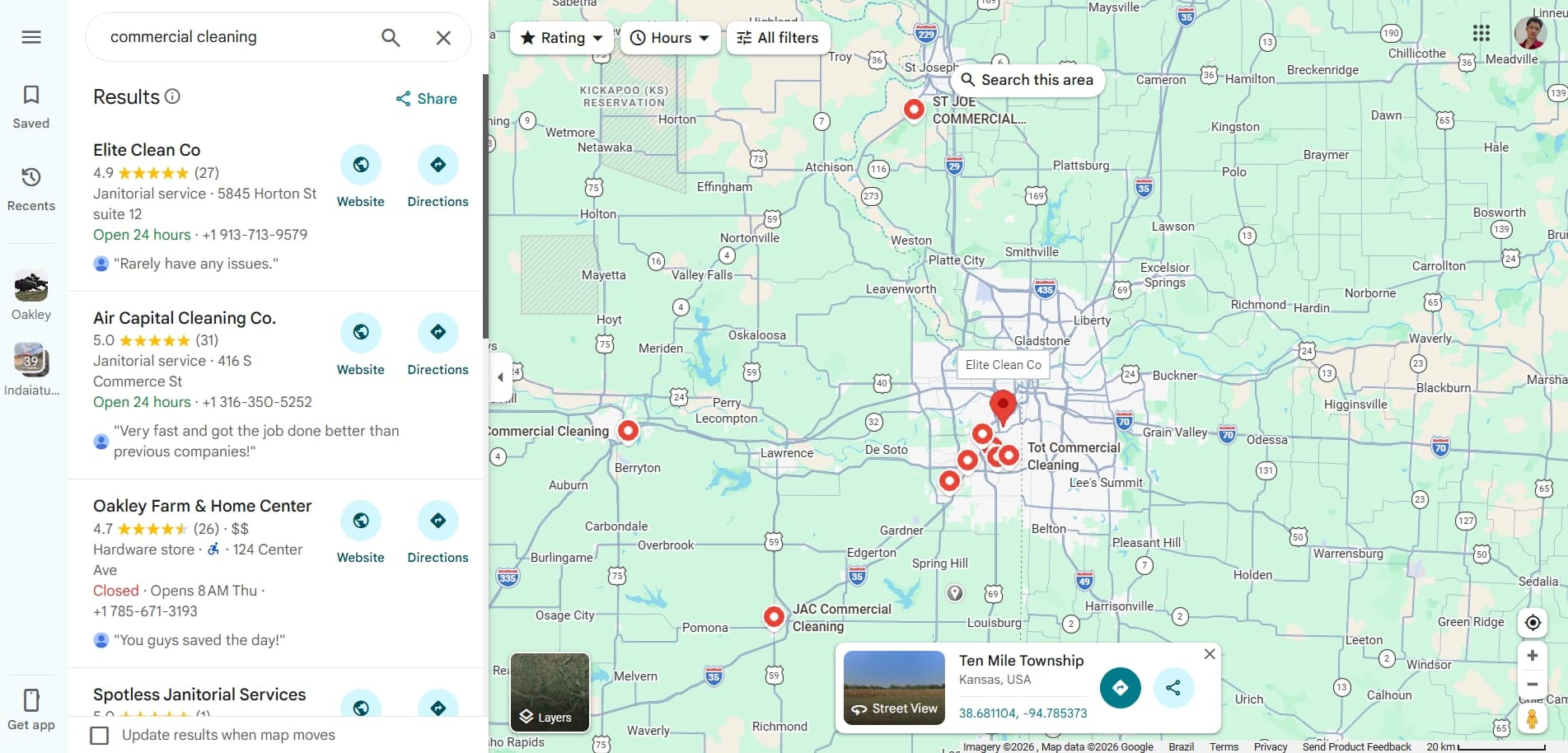
Using category searches
Start with plain English queries that match how owners label themselves, not how your product team talks internally. Try “commercial cleaning services in Phoenix,” “sheet metal fabrication Manchester,” or “private dental practice Leeds.” Click into each result, open the “Questions & answers” and photos when present, and note whether they answer the phone during listed hours. Rotate synonyms (cleaner vs janitorial, clinic vs practice) so you do not miss clusters that use different words in their primary category.
Reading listing signals (no website, few reviews, incomplete profile)
Treat the listing like a scouting report. A missing or broken website, or only a Facebook page in the website field, can mean digital maturity is low—often a fit if you build sites or funnels. Very few reviews with gaps in responses can mean reputation work is urgent. Duplicate or conflicting addresses suggest data hygiene issues. Seasonal closure notes, messy photo sets, and inconsistent NAP across Maps and the open web are all clues. For a deeper playbook on listings without a proper site, read how to find businesses without a website on Maps.
Qualifying leads directly from the listing
Before you add a row to your sheet, answer four questions: category fit, geography fit, reachable channel (phone, email on site, WhatsApp link in site or posts), and one concrete observation you can reference in outreach (“saw you added weekend hours—congrats on the expansion”). If you cannot pass all four, park the account or mark it for later. For teams that batch reviews, keep a “maybe” column instead of guessing; a second pass after coffee catches false negatives.
How to Scale Google Maps Prospecting
The problem with manual search
Manual Maps work breaks when you need weekly lists in multiple cities, multi-seat collaboration, or exports your ops person can trust. Copy-paste errors, duplicate phones, and mixed column formats create silent failures downstream. You also lose the mental map of “why this lead made the cut” unless you standardize notes. That is when teams graduate from heroics to tooling without abandoning judgment on who is worth a touch.
How tools like GetNewProspects automate this
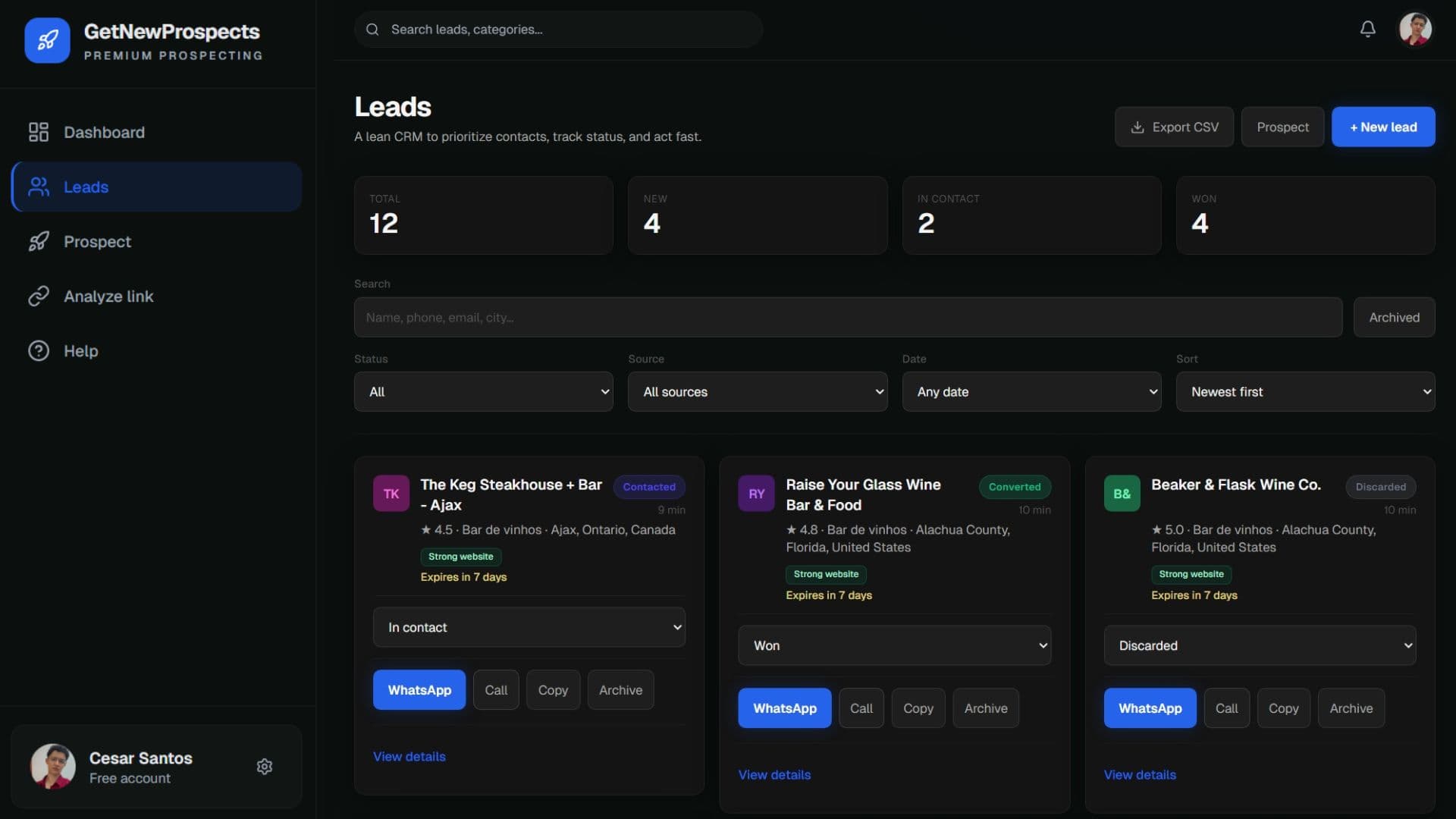
Automation should repeat your hypotheses, not replace them. A solid tool preserves category and geo filters, captures stable identifiers, fills structured fields consistently, and hands you a list you can enrich or load into outreach. GetNewProspects is built around that workflow so you spend minutes defining the search and hours on conversations, not on clerical rescue. The full methodology—including how this ties to your outbound motion—is on the Google Maps lead generation playbook.
What a structured lead list looks like
Expect columns such as business name, primary category, full address, phone, website URL, Maps URL or place reference, your qualification note, owner or generic inbox when verified, and next action with date. Add a “source query” column so you can reproduce the search later. Dedupe on phone first, then normalized domain. Keep personal fields (mobile numbers scraped from non-public sources) out unless you have a lawful basis—stick to what the business advertises. Structured lists make handoffs to VA, SDR, or founder-led outreach predictable, which is the difference between dabbling in google maps prospecting and running it as a channel.
How to Qualify the Leads You Find
Signals that indicate a warm lead
Warmth is contextual to your offer. Generally, look for recent reviews or owner replies, evidence of hiring or second locations, active posts on linked social, professional photos, clear service menus with prices, and phone numbers that connect to a human during business hours. If you sell paid media, “open now” badges without landing pages may be warmer than a polished site with no call tracking. Document your top five positive signals and score them lightly so the team calibrates the same way.
Signals to skip
Skip permanent closures, gross category mismatches, lead gen traps that aggregate other brands, and listings where your offer has no plausible ROI story. Be cautious with sensitive regulated categories unless you have compliance coverage. Also deprioritize businesses you will not serve ethically—or where your win would harm end customers. An empty skip list eventually clogs your pipeline and trains bad messaging habits.
What to Do After You Have the Leads
Cold outreach basics
Lead with relevance, not volume. One or two specific observations from Maps beat a generic compliment. Keep the first message short: who you are, what you noticed, a single hypothesis, one ask (book a ten-minute call or reply with the right contact). Space sends so you can handle replies humanly. Log outcomes so next week’s list inherits what worked. If you batch by neighborhood, you can mention local proof without naming competitors in a way that feels creepy.
WhatsApp and email as first contact channels
In many markets, WhatsApp is the business inbox—especially for trades, hospitality, and owner-operators. Email still wins when a site lists a named contact. Match the channel to how the business already invites customers to reach them. Always identify yourself, state why you are writing, and make opt-out easy. If you use both channels, avoid duplicate spamming the same hour; pick the higher-trust path first based on what the listing and site imply about their habits.
Common Mistakes When Prospecting on Google Maps
Teams new to maps sourcing often chase pin count over quality, blast identical scripts, ignore timezone and local holidays, or confuse a lead with a contract. Others fail to dedupe and message two listings for the same owner. Some treat “no website” as automatically bad when it is sometimes a buying signal—context matters, as in our companion piece on businesses without a public site. Fix these by tightening ICP, templating only the skeleton of your note, and reviewing a weekly sample of sent messages as a team. If you need packaging for your first paid seat, compare plans on the pricing page before you scale sends.
Ready to turn repeatable Maps searches into a pipeline you can work every week?
See how GetNewProspects automates thisRelated guides
- How to Find Businesses Without a Website (Step-by-Step Guide)
Learn to spot high-intent Google Maps listings with no public site, qualify them ethically, and scale capture with structured lead lists.
Frequently asked questions
- Is it legal to get leads from Google Maps?
- Yes, you can generally use publicly visible business information for good-faith B2B outreach, but rules vary by region and channel: follow applicable marketing, privacy, and anti-spam laws; respect opt-out requests; and avoid deceptive or harassing contact. Google’s own terms apply to how you use their products—use Maps to discover businesses, then validate details on legitimate channels (their site, email, or a number they publish). When in doubt, get qualified legal advice for your jurisdiction and use case.
- How many leads can I find on Google Maps?
- It depends on your niche and geography. A tight city-plus-category search might surface dozens to hundreds of distinct listings; broader metros or multi-location industries can reach thousands before deduplication. The real limit is not raw pins—it is how many accounts you can research and contact well in a week. Cap volume to what your team can personalize and follow up on.
- Do I need a tool or can I do it manually?
- You can start manually: search, open listings, and copy details into a spreadsheet. Tools matter when you repeat the same searches weekly, need consistent fields (name, phone, category, place URL), or want to hand off lists to teammates. A product like GetNewProspects is built to turn repeatable Maps hypotheses into structured lead lists.
- What's the best niche to prospect on Google Maps?
- The best niche is the one where you already deliver outcomes, where buyers budget monthly for your category, and where Maps is the main discovery surface—think local services, clinics, restaurants that run catering, trades, logistics depots, or B2B suppliers with physical presences. Avoid chasing every industry at once; pick one ICP, one geography, and iterate.